CRAFT Method: Boost AI Prompt Efficiency by 40%
Using the CRAFT Method for AI Prompts
Tailored, well-engineered prompts reduce AI errors by roughly 28% compared to ad-hoc prompting. That single statistic should change the way you think about every interaction you have with an AI tool. Not which model you use. Not which subscription tier you pay for. How you ask the question.
According to recent prompt engineering benchmarks reported by SQ Magazine, structured prompts increase output accuracy by an estimated 35%, and overall efficiency metrics improve by up to 40% when structured prompting practices are adopted. The takeaway is straightforward: the fastest, cheapest way to get better results from AI is not upgrading your tools. It is upgrading how you talk to them.
This article breaks down why structured prompting frameworks matter, introduces one called CRAFT, and shows you how to put it to work in everyday business writing.
The Case for Structure
Most people start using AI the same way. They type a quick sentence into the prompt box, hit enter, and hope for something useful. Sometimes it works. Often, the result is generic, vague, or slightly off target. So they rephrase, try again, tweak the wording, and eventually settle for "close enough."
That cycle is not just frustrating. It is a productivity drain. Every round of reworking and reprompting is time you could spend on higher-value tasks. And the root cause is almost never the AI itself. Modern large language models are remarkably capable. The bottleneck is on our side: how clearly and consistently we communicate what we need.
This is where structured prompting frameworks come in. A structured framework gives you a repeatable template for how to write prompts. Instead of starting from scratch every time and hoping you remember all the important details, you follow the same format. That consistency keeps your prompts familiar, easy to build, and easy to read when you revisit them later. It also means you are far less likely to leave out critical information that would have improved the output.
Think of it like a well-defined API contract. Software developer Nagesh Chauhan made this analogy when writing about structured prompts: just as a clear API contract reduces integration errors between systems, a clear prompt structure reduces hallucination and irrelevant output by minimizing what the AI has to guess. The less guessing the AI does, the better your results.
You Have Options, and That Is the Point
CRAFT is not the only structured prompting framework available. Several others have gained traction in recent years:
- CARE (Context, Ask, Rules, Examples), developed by the Nielsen Norman Group for UX and design workflows
- CO-STAR (Context, Objective, Style, Tone, Audience, Response), popular in marketing and communications
- RISEN (Role, Instructions, Steps, End goal, Narrowing), used in technical and project management contexts
- CLEAR (Context, Language, Examples, Audience, Rules), favored in academic and research settings
Each of these frameworks organizes the same basic idea in slightly different ways. They all push you to provide context, define expectations, and specify the format of the output. The honest truth is that any of them will improve your results if you use one consistently.
The key word is consistently. Research shows that prompt design choices can outperform simply using a larger, more expensive model by up to 25%. That means how you structure your prompt matters more than which AI you are talking to. But you only capture that advantage if you build the habit. Bouncing between frameworks, or abandoning structure whenever you are in a rush, puts you right back into ad-hoc territory.
Pick a framework. Learn it. Use it every time. That discipline is worth more than any prompting trick you will find online.
Breaking Down CRAFT
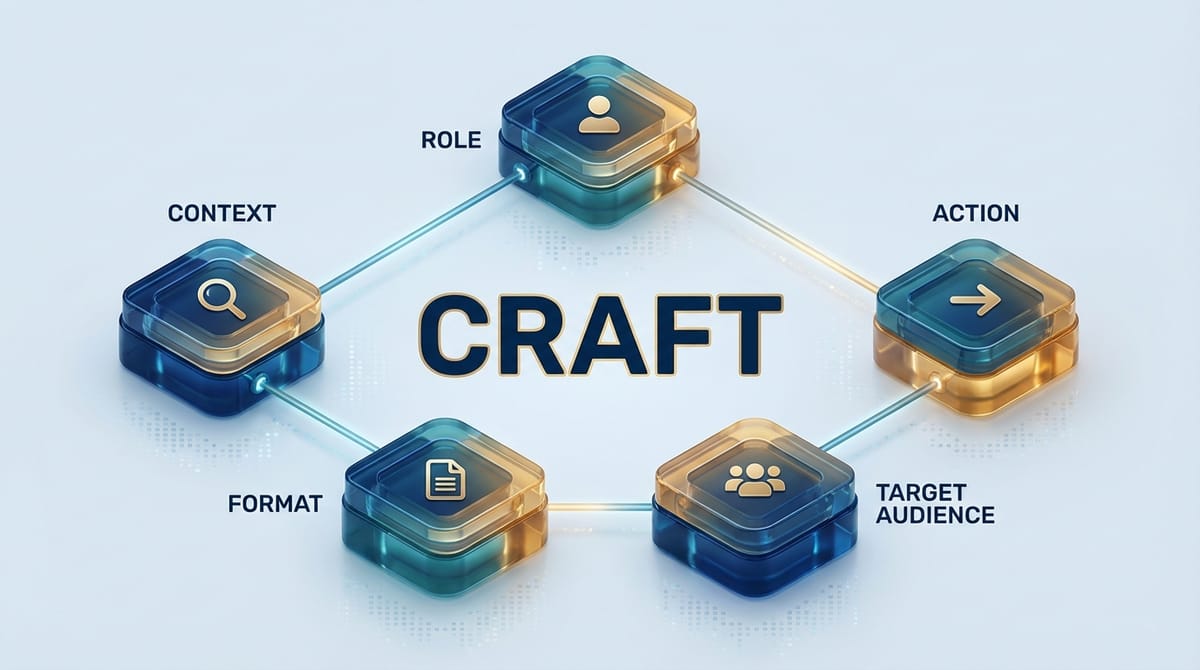
CRAFT stands for Context, Role, Action, Format, and Target Audience. Each element addresses a specific piece of information that helps the AI produce a focused, relevant response. Here is what each one does:
Context sets the scene. It tells the AI what situation you are working in, what background information is relevant, and what constraints exist. Without context, the AI fills in the blanks with generic assumptions.
Role defines who the AI should "be" for this task. Are you asking it to write as a senior marketing strategist? A technical editor? A project manager summarizing a status update? Assigning a role shapes the tone, vocabulary, and depth of the response.
Action specifies exactly what you want the AI to do. This is the task itself: write, summarize, analyze, compare, draft, rewrite. The more precise the action, the more precise the output.
Format describes how the output should be structured. Do you want bullet points, a narrative paragraph, a table, a numbered list? Specifying the format eliminates one of the most common frustrations with AI output: getting the right information in the wrong shape.
Target Audience tells the AI who will read the output. Writing for a C-suite executive looks very different from writing for a technical team or a customer-facing FAQ. Defining the audience adjusts the complexity, tone, and focus of the response.
None of these elements are complicated on their own. The power comes from using all five together, every time, so that your prompts are complete and your results are predictable.
See the Difference: Generic vs. CRAFT
The best way to understand why structure matters is to see it in action. Consider a common business writing task: drafting a quarterly update email to stakeholders.
The generic prompt:
Write a quarterly update email about our Q1 results.
This will produce something. It will also be vague, filled with placeholder language, and probably end with "In conclusion" or "We look forward to continued success." You will spend the next 15 minutes rewriting it.
The CRAFT prompt:
Context: Our SaaS company exceeded Q1 revenue targets by 12%, launched two new integrations (Salesforce and HubSpot), and expanded the customer success team from 8 to 14 people. Customer churn decreased from 4.2% to 3.1%.
Role: You are the VP of Operations writing to the company's board of directors and key investors.
Action: Draft a quarterly update email that highlights the three biggest wins, acknowledges one area for improvement (onboarding speed for new hires), and outlines two priorities for Q2.
Format: Professional email format. Use short paragraphs. Bold the key metrics. Keep the total length under 400 words.
Target Audience: Board members and investors who are familiar with the business but want a concise, data-driven summary without technical jargon.
The difference is not subtle. The CRAFT version gives the AI everything it needs to produce a draft that is close to final on the first try. That is where the productivity gain lives: not in the AI being smarter, but in you being clearer.
More Quick Examples
Once you have the CRAFT structure down, applying it becomes second nature. Here are a few more business writing scenarios:
Meeting summary:
Context: 45-minute product roadmap review with engineering, design, and product leads. Key decisions: prioritize mobile notifications for Q2, defer the dashboard redesign to Q3, and allocate two engineers to the API performance project.
Role: Project manager.
Action: Write a meeting summary capturing decisions, action items, and owners.
Format: Bullet points grouped by topic. Bold the action items.
Target Audience: All meeting attendees and their direct reports who were not present.
Client proposal intro:
Context: We are a digital transformation consulting firm pitching a 6-month engagement to a mid-size healthcare company that needs to modernize its patient intake workflow.
Role: Senior engagement manager.
Action: Write the opening section of a proposal that establishes credibility, identifies the client's core challenge, and previews our recommended approach.
Format: Three to four paragraphs, professional but warm. No bullet points in this section.
Target Audience: The client's COO and IT director, who are evaluating three competing proposals.
Weekly project status report:
Context: Software development project, sprint 4 of 8. Velocity is on track. One blocker: third-party API documentation is incomplete, delaying the integration module by an estimated 3 days.
Role: Scrum master.
Action: Write a weekly status update covering progress, blockers, and next steps.
Format: Short paragraphs with bold section headers for Progress, Blockers, and Next Steps. Keep it under 250 words.
Target Audience: The product owner and engineering director, who review status reports for six teams every Monday.
Each of these takes about 60 seconds longer to write than a generic prompt. The time you save on editing, reprompting, and rewriting more than makes up for it.
Building the Habit
The real productivity unlock from structured prompting is not any single prompt. It is the compound effect of using the same structure over and over. When every prompt you write follows the same five-element pattern, several things happen:
Your prompts become faster to write because the structure is automatic. You stop staring at a blank prompt box trying to figure out where to start.
Your results become more consistent because you are providing the same depth of information every time. The AI has less room to guess, so its outputs are more predictable.
Your prompts become easier to share and reuse. A well-structured prompt is essentially a template. Save the ones that work well, swap out the context for a new situation, and you have a prompt library that scales across projects and teams.
Organizations that treat prompt development as an engineering discipline, complete with templates, standards, and shared libraries, ship more consistent AI-assisted work and iterate faster than teams where every person prompts differently. The pattern mirrors what every other professional discipline has already learned: coding standards, style guides, design systems. Consistency is not glamorous, but it compounds.
Pick a Framework, Use It Every Time
AI models are powerful enough. That is no longer the question. The question is whether the people using them are structured enough to get the full value out of every interaction.
Structured prompting frameworks like CRAFT, CARE, CO-STAR, and others exist to close that gap. They are simple, learnable, and effective. The data backs it up: 35% better accuracy, 28% fewer errors, 40% efficiency gains. But none of those numbers matter if you only use the framework when you remember to.
The best prompting method is the one you use consistently. Pick one. Learn the elements. Apply it to the next email you draft, the next report you summarize, the next proposal you write. Let the structure do the heavy lifting so you can focus on the thinking that actually requires a human.
That 28% error reduction is not a ceiling. It is a floor. And consistency is what builds on top of it.
Sources
- SQ Magazine, "Prompt Engineering Statistics 2026"
- Lakera AI, "The Ultimate Guide to Prompt Engineering in 2026"
- Nielsen Norman Group, "CARE: Structure for Crafting AI Prompts"
- Nagesh Chauhan, "Mastering the CRAFT Method of Prompt Engineering" (Medium)
- Alexander Young, "How to CRAFT the Perfect Prompt"
- Braintrust, "Systematic Prompt Engineering: From Trial and Error to Data-Driven Optimization"
- MITRIX Technology, "Prompt Engineering: Why Consistent AI Results Require Tweaking"